
Pitched at your level
Choose A1 through C2 and the AI only picks words that are challenging but achievable for you right now.
AI vocabulary flashcards
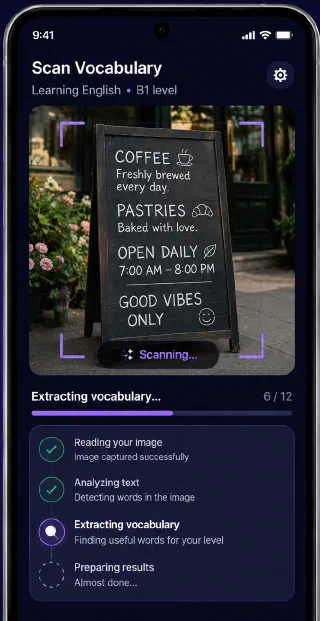
Radicard reads any photo — a street sign, a café menu, a book page — and turns it into 5–15 vocabulary cards matched to your level. Save them, review them, remember them.
How it works
Five steps, and only the first one needs any effort from you.
Point your camera at anything with text on it, or pick an image from your gallery.
Gemini reads the image and pulls out 5–15 words that are useful at your level.
Flip through the words one by one. Save, skip or edit before anything lands in your library.
Every word you keep is stored on your device with its translation and an example sentence.
The Leitner system brings each word back exactly when you're about to forget it.
Try it here
Radicard's review cards show the word on one side and the translation plus a real example sentence on the other. Tap the card to flip it — exactly as it behaves in the app.
Tap the card to flip it, or switch which side comes first.
Features
Not a fixed deck someone else wrote. A library made from your own day.
Choose A1 through C2 and the AI only picks words that are challenging but achievable for you right now.
Seven boxes, widening intervals. Words you know drift away; words you don't come straight back.
Browse, search, filter, edit and delete. Every word keeps the translation and example it was learned with.
Pick the language you speak and the one you're learning. Translations land in your native language.
Your library and your study sessions live on your device. Only scanning a new photo needs a connection.
Photos are sent to Google's Gemini API to be read, and are never stored on a server. Your words stay on your phone.
Spaced repetition
Every new word starts in box 1. Get it right and it moves up, so you see it less often — all the way out to four months. Get it wrong and it drops straight back to the start.
Languages
Learn any of these, from any of these. Translations always come back in the language you already speak.
And six levels, following the CEFR scale:
Pricing
The library, the study sessions and every language are free forever. Premium only lifts the scanning limit.
€0forever
Everything you need to find out whether this fits how you learn.
€39per year
For when one scan a day stops being enough.
Prices in EUR. Subscriptions are billed and managed through Google Play — cancel any time from your Play Store account.
FAQ
You photograph something with text on it — a page, a sign, a menu. Radicard sends the image to Google's Gemini AI, which picks out 5–15 words that are useful at your chosen level, translates them into your native language and writes an example sentence for each. You decide which ones to keep, and they become flashcards you review with spaced repetition.
Yes. The free tier gives you one photo scan per day, with no limit on how many words you save or how much you study. Premium is €39 per year with a 7-day free trial, and lifts the scanning limit.
Twelve: English, German, Spanish, French, Italian, Portuguese, Turkish, Russian, Arabic, Persian, Chinese and Japanese. You pick the language you speak and the one you're learning, in any combination.
Almost entirely. Your word library, your study sessions and all your settings live on your device, so you can review on a plane or underground. The only thing that needs a connection is scanning a new photo, because that's when the AI reads the image.
Your photo is sent to Google's Gemini API so it can be read, and it is not stored on any server of ours. A copy stays in your phone's app storage so you can see where a word came from. Full details are in the privacy policy.
The iOS build is finished and currently in App Store review. It will go live on this page the moment it's approved.
Get started
Download Radicard, point your camera at something, and see what it finds.